

Description
Description
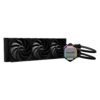
The Be Quiet! Pure Loop 2 360mm Liquid CPU Cooler BW019 supports cooling compatible computer hardware. This CPU cooler is for PC builders matching cooling parts to their system.
The cooling type is Liquid. Also, the radiator size is 360mm. The pump speed is 5500 RPM (Adjustable 4000 ~ 5500 RPM PWM).
Also, the fan speed is Up to 2100 RPM. The fan control method is PWM. Also, the lighting is ARGB (Cooling Block). The color is Black.
First, check the supported sockets or mounting points against your hardware. Also, compare the dimensions with the clearance inside your case. For example, a larger cooler can interfere with memory modules or side panels. Next, check the fan and lighting connectors against your motherboard. In addition, review the stated fan count when planning airflow. Finally, follow the installation instructions for the exact model. Keep its reference available when selecting matching mounting hardware or replacement fans.
For the Be Quiet! Pure Loop 2 360mm Liquid CPU Cooler BW019, keep the model details with your equipment records. Also, use the same reference when comparing accessories and replacement parts. This helps distinguish products with similar names when planning future purchases.
Product summary
The Be Quiet! Pure Loop 2 360mm Liquid CPU Cooler BW019 is a CPU cooler. Cooling Type: Liquid; radiator size: 360mm.
Specifications
| Brand | be quiet! |
|---|---|
| Model / supplier reference | BW019 |
| Cooling Type | Liquid |
| Radiator Size | 360mm |
| Pump Speed | 5500 RPM (Adjustable 4000 ~ 5500 RPM PWM) |
| Fan Speed | Up to 2100 RPM |
| Fan Control Method | PWM |
| Lighting | ARGB (Cooling Block) |
| Color | Black |
| Feature | Supports Intel & AMD Sockets |
Frequently asked questions
The Be Quiet! Pure Loop 2 360mm Liquid CPU Cooler BW019 is a CPU cooler for cooling compatible computer hardware.
This CPU cooler is for PC builders matching cooling parts to their system.
Cooling Type: Liquid.
Radiator Size: 360mm.
Pump Speed: 5500 RPM (Adjustable 4000 ~ 5500 RPM PWM).
First, check the supported sockets or mounting points against your hardware.
Explore Fans & Cooling, Computer Components, Computers & Laptops.