Description
Description
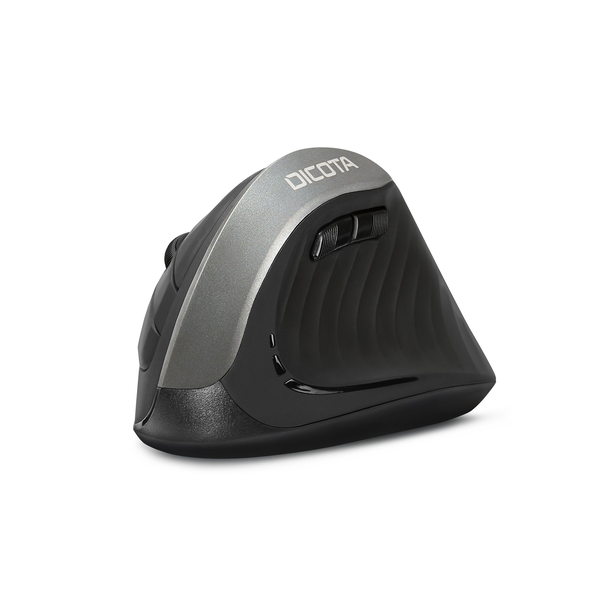
The Dicota Wireless Ergonomic Mouse Relax D31981 supports controlling a compatible computer. This mouse is for office and home computer users.
The form factor is Vertical Design. Also, the connectivity is Wireless. The sensor is High-precision sensor.
Also, the max dpi is 1600 DPI. The buttons details are 6 (Left/Right-click, Back/Forward, Middle click/scroll wheel, DPI switch). Also, the color is Black.
Check the connection type against the ports or wireless features on your computer. Also, compare the layout and dimensions with your working preferences. For example, check the stated package contents when a wireless receiver is required. Finally, follow the device instructions for pairing, charging or battery replacement.
For the Dicota Wireless Ergonomic Mouse Relax D31981, keep the model details with your equipment records. Also, use the same reference when comparing accessories and replacement parts. This helps distinguish products with similar names when planning future purchases.
Before ordering, compare the complete model reference with the item you intend to use or replace. Also, review the listed specifications together, since a single feature does not describe the full configuration. Finally, use the specification table below to check the details that matter for your equipment and working setup.
Product summary
The Dicota Wireless Ergonomic Mouse Relax D31981 is a mouse. Form Factor: Vertical Design; connectivity: Wireless.
Specifications
| Brand | Dicota |
|---|---|
| Model / supplier reference | D31981 |
| Form Factor | Vertical Design |
| Connectivity | Wireless |
| Sensor | High-precision sensor |
| Max DPI | 1600 DPI |
| Buttons | 6 (Left/Right-click, Back/Forward, Middle click/scroll wheel, DPI switch) |
| Color | Black |
Frequently asked questions
The Dicota Wireless Ergonomic Mouse Relax D31981 is a mouse for controlling a compatible computer.
This mouse is for office and home computer users.
Form Factor: Vertical Design.
Connectivity: Wireless.
Sensor: High-precision sensor.
Check the connection type against the ports or wireless features on your computer.
Explore Keyboards & Mice, Computer Accessories, Computers & Laptops.