




Description
Description
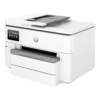
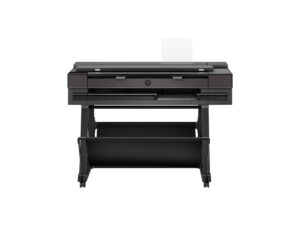
The HP 537P5C printer supports producing printed output. This printer is for users selecting equipment for a matching printing task.
The print technology is Thermal Inkjet. Also, the functions details are Print, Scan, Copy. The print speed is Up to 22 ppm (Black), Up to 18 ppm (Color).
Also, the print resolution is Up to 1200 x 1200 dpi (Black), Up to 4800 x 1200 dpi (Color). The scanner type is Flatbed, ADF. Also, the scanner technology is Contact Image Sensor (CIS). The scanner resolution is Up to 1200 dpi (Optical).
Compare the printing method and supported media with the documents you produce. Also, check the connection requirements against your computer or network. For example, review the supply reference when planning replacement consumables. Finally, confirm the selected model and any stated package contents before arranging installation.
For the HP 537P5C printer, keep the model details with your equipment records. Also, use the same reference when comparing accessories and replacement parts. This helps distinguish products with similar names when planning future purchases.
Product summary
The HP 537P5C printer is a printer. Print technology: Thermal Inkjet; functions: Print, Scan, Copy.
Specifications
| Brand | HP |
|---|---|
| Model / supplier reference | 537P5C |
| Print technology | Thermal Inkjet |
| Functions | Print, Scan, Copy |
| Print Speed | Up to 22 ppm (Black), Up to 18 ppm (Color) |
| Print Resolution | Up to 1200 x 1200 dpi (Black), Up to 4800 x 1200 dpi (Color) |
| Scanner Type | Flatbed, ADF |
| Scanner Technology | Contact Image Sensor (CIS) |
| Scanner Resolution | Up to 1200 dpi (Optical) |
| Processor speed | 1.2 GHz |
| Memory | 512 MB |
| Display | 4.3" LCD Color Touchscreen |
Frequently asked questions
The HP 537P5C printer is a printer for producing printed output.
This printer is for users selecting equipment for a matching printing task.
Print technology: Thermal Inkjet.
Functions: Print, Scan, Copy.
Print Speed: Up to 22 ppm (Black), Up to 18 ppm (Color).
Compare the printing method and supported media with the documents you produce.
Explore Printers, Printer & Technology, Office & Networking.





Reviews
There are no reviews yet.