
Description
Description
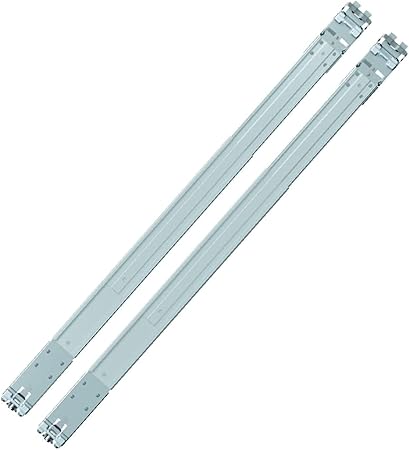
The Synology RKS-02 NAS enclosure supports storing data with compatible equipment. This NAS enclosure is for users selecting storage for a matching device or system.
The feature is Sliding rack rails for Synology rackmount servers. Also, the feature is Fits rack depths from 610 mm to 890 mm. The feature is Requires mount post width ≥ 450 mm, panel width ≥ 480 mm.
Also, the feature is Supports square holes (≥9.5 mm) and round holes (≥7.1 mm). The feature is Easy installation with stable slide mechanism.
Compare the storage format and interface with your device documentation. Also, check the stated capacity when planning the files you need to store. For example, keep a separate backup of files that you cannot replace. Finally, follow the device instructions for installation, formatting and removal.
For the Synology RKS-02 NAS enclosure, keep the model details with your equipment records. Also, use the same reference when comparing accessories and replacement parts. This helps distinguish products with similar names when planning future purchases.
Product summary
The Synology RKS-02 NAS enclosure is a NAS enclosure. Feature: Sliding rack rails for Synology rackmount servers; feature: Fits rack depths from 610 mm to 890 mm.
Specifications
| Brand | Synology |
|---|---|
| Model / supplier reference | RKS-02 |
| Feature | Sliding rack rails for Synology rackmount servers |
| Feature | Fits rack depths from 610 mm to 890 mm |
| Feature | Requires mount post width ≥ 450 mm, panel width ≥ 480 mm |
| Feature | Supports square holes (≥9.5 mm) and round holes (≥7.1 mm) |
| Feature | Easy installation with stable slide mechanism |
Frequently asked questions
The Synology RKS-02 NAS enclosure is a NAS enclosure for storing data with compatible equipment.
This NAS enclosure is for users selecting storage for a matching device or system.
Feature: Sliding rack rails for Synology rackmount servers.
Feature: Fits rack depths from 610 mm to 890 mm.
Feature: Requires mount post width ≥ 450 mm, panel width ≥ 480 mm.
Compare the storage format and interface with your device documentation.
Explore Network Attached Storage (NAS), Computer Components, Computers & Laptops.




Reviews
There are no reviews yet.